

An effective support escalation process guarantees a named owner, a continuous SLA clock and clear customer communication from the moment a case triggers to the moment it closes. If you have none of these, start with the cheapest fix: publish your severity definitions and build a minimal Level 1 to Level 2 matrix this week. Everything else in escalation management is refinement on top of that foundation.
TL;DR:
- Define specific escalation triggers based on SLA percentages, VIP status, or repeat contacts to prevent subjective judgment and ensure timely responses.
- Assign a clear, named owner for each escalation level immediately to avoid customer frustration caused by defaulting to shared queues.
- Implement automation for SLA tracking, routing, and sentiment detection to reduce stalled handoffs and maintain continuous case context.
- Focus on frontline training, decision templates, and authority limits to lower unnecessary escalations driven by avoidable issues.
- Maintain detailed audit trails of all escalations, including handoffs and decision logs, especially in regulated sectors where compliance evidence is critical.
Table of Contents
- What is a support escalation process and why does it matter?
- What are the main types of support escalation?
- How do you build an escalation matrix that actually works?
- How do you hand off an escalation without losing context?
- What tools and automation enforce escalation rules?
- How do you reduce unnecessary escalations?
- What metrics show whether your escalation process is working?
- Why audit trails matter more than speed in regulated support
- Managing escalations in a regulated player support operation
- Where to go for escalation templates and standards
- Sources
What is a support escalation process and why does it matter?
A support escalation process is the defined path a case follows once frontline agents can’t (or shouldn’t) resolve it alone: detect the problem, trigger the escalation, route it to the right team, assign an owner, communicate with the customer, resolve the issue, and review what happened afterwards.
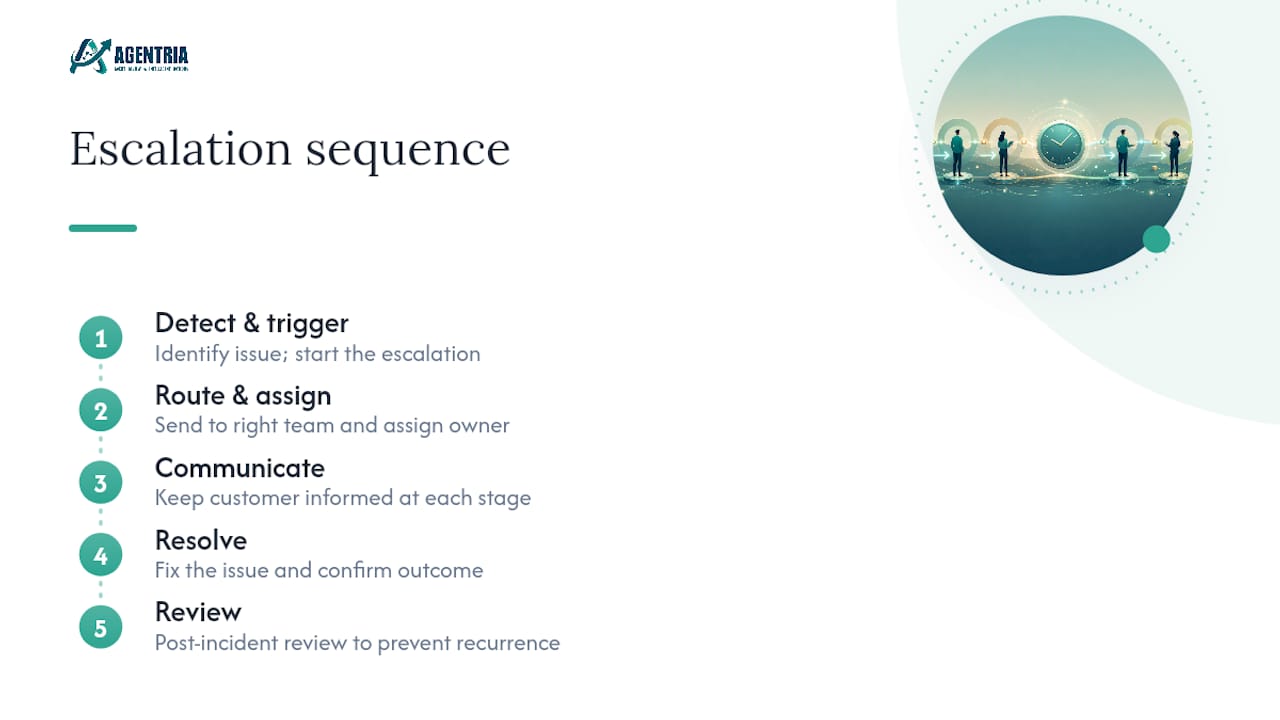
That last step gets skipped constantly, and it’s the one that stops the same fault recurring next month.
Done properly, this sequence does three things. It reduces churn by giving frustrated customers a visible, accountable path rather than silence. It keeps customers informed at each stage and gets the case to someone who can actually close it: getting an issue resolved in a single interaction and dealing with a knowledgeable representative top the list of what customers say matters most in a good service experience, according to survey data on Statista, and not having to repeat themselves after a transfer follows close behind. And in regulated sectors like gambling or finance, it preserves a documented trail that protects you when a complaint becomes a compliance question.
The sections below build this out: escalation types, a working matrix template, handoff discipline, automation, prevention, and the metrics that keep the whole system honest.
What are the main types of support escalation?
Most support organisations run into four escalation patterns, and mixing them up is where matrices break down.
- Functional escalation moves a case sideways to a specialist team when the frontline lacks the technical skill, not the authority, to fix it. A billing glitch going to the payments engineering team is functional.
- Hierarchical escalation moves a case upward to someone with more authority, typically because it needs a decision the agent can’t make alone, such as a refund above a threshold or an exception to policy.
- Automatic escalation fires without human judgement, triggered by an SLA breach, a timer, or a flag on a VIP account. This is the escalation type most vulnerable to being ignored if nobody owns the alert.
- Priority or relationship escalation applies to strategic accounts or anything carrying regulatory risk, where the trigger isn’t severity alone but who is affected. HubSpot’s guide describes the first three, functional, automatic and hierarchical, as the standard types; Featurebase adds priority-based escalation as the fourth, and it is the one regulated teams most need.
How do you build an escalation matrix that actually works?
An escalation matrix is only useful if it forces behaviour rather than describing intentions. Every row needs five columns: level, trigger, owner, response commitment, and customer communication cadence.
The trigger column is where most matrices go soft. Vague language like “if the issue is serious” invites disagreement at 2am. Specific thresholds don’t. Escalation automation research points to trigger-based rules, such as escalating automatically once a case reaches 75 to 80% of its resolution target, as a way to remove subjective judgement calls that cause both premature and delayed escalations.
Pro Tip: Set your SLA-percentage trigger before you launch the matrix, not after your first missed deadline. Retrofitting thresholds under pressure produces numbers chosen to avoid blame, not numbers that reflect real risk.
Your matrix documentation should include:
- Severity definitions visible to customers, not just internal staff
- A single owner per level, named by role, never a shared queue
- A response commitment measured in minutes or hours, not “as soon as possible”
- The next-update cadence promised to the customer at each level
- The specific condition that moves a case up a level (SLA percentage, VIP flag, repeat contact count)
Supportbench’s escalation checklist lists named owners, running SLA clocks, and a review loop as the non-negotiable core of a working system, and a matrix without those three elements is really just an org chart.
How do you hand off an escalation without losing context?
The single biggest driver of customer frustration during an escalation is being asked to repeat the issue. That happens because ownership defaults to a queue instead of a person.
Fix that with one rule: every escalated case gets a named owner, not a team name, the moment it crosses a level. Cisco’s own severity and escalation guidelines require specific intake fields before a case can connect to a resolution owner, and those fields are worth copying wholesale.
A complete handoff needs, at minimum:
- Full case history and every step already tried
- Attachments, logs, or screenshots already gathered
- The SLA clock status, showing time already consumed, not restarted
- A note on customer sentiment, so the next agent doesn’t reopen a wound
- The next-update time already promised to the customer
Pro Tip: Give agents a pasteable acknowledgement they can send within minutes of a handoff: “Your case has moved to [name], who now owns it. Expect an update by [time].” Named accountability calms customers more reliably than speed alone, according to Supportbench’s analysis of escalation behaviour.
What tools and automation enforce escalation rules?
Rules written in a document get ignored under pressure. Rules built into your support platform don’t.
The automation patterns worth prioritising are SLA timers that count continuously through handoffs, rule-based routing that fires on defined triggers rather than agent discretion, sentiment flags that catch a deteriorating conversation before it hits a hard threshold, and dedicated lanes for VIP or high-risk accounts. Built-in automation means fewer stalled handoffs, because nobody has to remember to check a clock manually.
When evaluating a platform, check for:
- A shared inbox that shows full history across every channel, not siloed threads
- Workflow routing tied to your actual matrix triggers, not generic priority tags
- An audit trail recording who saw what, and when, at every level
- Internal cross-team tickets that don’t reset the customer-facing SLA clock
Tools built for omni-channel context preservation matter most here, because a handoff that loses conversation history is functionally the same as losing ownership.
How do you reduce unnecessary escalations?
Fewer escalations beats faster ones. That starts with the frontline, not the escalation matrix itself.
Give agents focused playbooks and decision templates for the ten or fifteen issues that generate most escalations, rather than a general knowledge base nobody reads under pressure. Then grant explicit, documented authority for common fixes, refunds under a set amount, minor policy exceptions, so agents don’t escalate purely to cover themselves. Escalation management research frames this reduction in unnecessary escalations as a direct function of better frontline tools and training, not stricter gatekeeping.
The upstream fix matters just as much. Run a monthly pattern analysis on what actually gets escalated:
- Which product bug or missing feature drives repeat escalations
- Which documentation gap forces agents to guess
- Which permission agents lack that they clearly need
If the same root cause appears three months running, that’s a product or process fix, not a training problem.
What metrics show whether your escalation process is working?
Four numbers tell you almost everything: escalation rate as a share of total tickets, time to named owner after a trigger fires, repeat escalations per account, and SLA adherence measured against the original clock, not a reset one.
Run a post-escalation review within a fixed window, five working days is reasonable, and capture what triggered it, what worked, and what should change in the matrix. Supportbench’s system checklist treats this review loop as the piece most teams skip and the one that prevents the same failure recurring.
For repeat escalations on the same account, assign an executive sponsor and report the trend monthly. That single habit turns escalation data from a support metric into a business signal worth board attention.
Why audit trails matter more than speed in regulated support
Speed gets the attention, but the audit trail is what actually protects you. In gambling and other regulated sectors, an escalation that turns into a regulatory question needs a documented handoff chain: who reviewed it, when, and under what authority. That’s the piece most escalation advice skips, because it assumes every industry can move fast and apologise later. Governed escalation processes with full audit trails exist precisely because that assumption fails in regulated markets.
Human-in-the-loop review isn’t a compliance tax on speed. It’s what lets you move fast without losing the record that proves you moved correctly. Start with the boring part: publish your severity definitions and enforce the named-owner rule before you touch anything else.
Managing escalations in a regulated player support operation
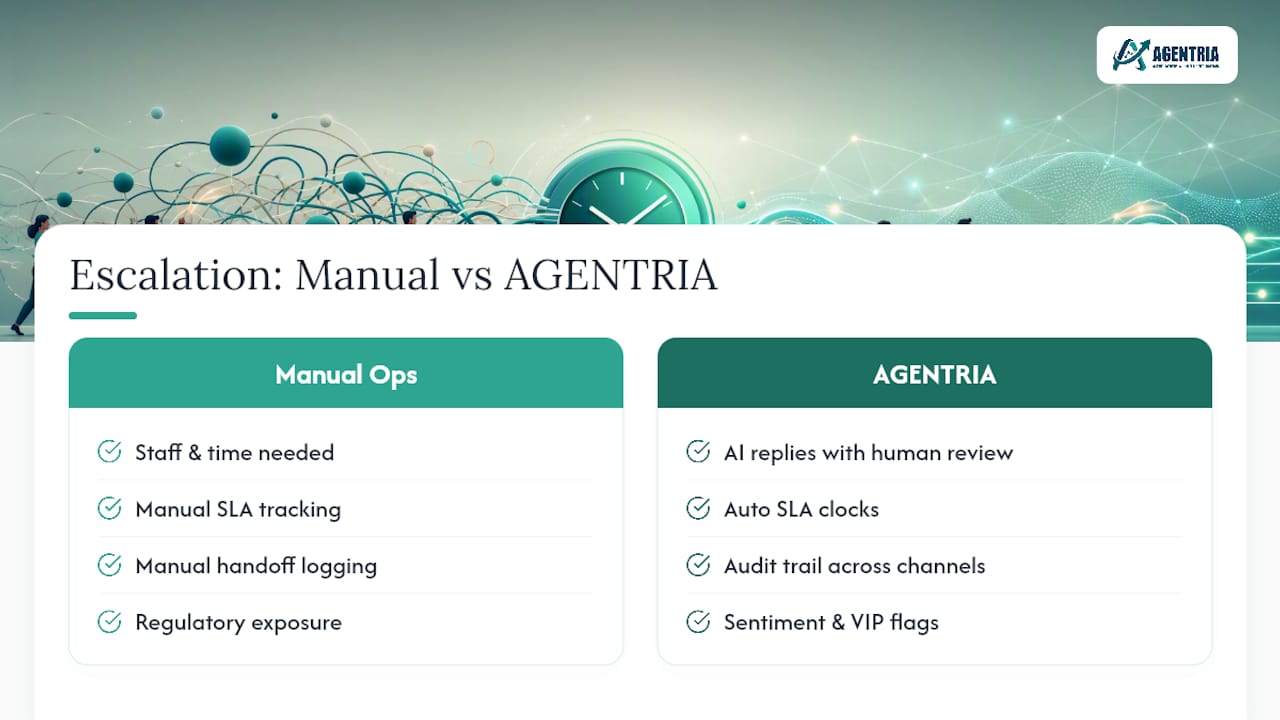
Everything above assumes you have staff and time to build a matrix, chase SLA clocks manually, and document every handoff by hand. In gambling operations specifically, volume and regulatory scrutiny make that manual approach fragile: one missed VIP escalation or one undocumented refund decision creates real exposure.
Pitbot is built around that specific problem. It combines multi-provider AI-drafted responses with a staff review queue: with auto send off, AI-drafted replies on email, live chat and Telegram wait for staff approval before they reach a player, so speed does not come at the cost of compliance. Every reply, every escalation, every decision gets logged into a full audit trail, across email, live chat, SMS and Telegram, with context preserved through every handoff instead of lost in a queue. Sentiment detection flags the cases that need a human owner, and thread assignment keeps them with that owner, which is the automation piece most matrices lack.
If your escalation process still depends on someone remembering to check a queue, look at how the AI player support platform routes drafts for approval and keeps a full escalation audit trail, or book a demo to see the escalation workflow directly.
Where to go for escalation templates and standards
For matrix wording and severity definitions, Cisco’s escalation guidelines and the Supportbench checklist are worth copying directly. For compliance-specific escalation design, see Pitbot’s responsible gambling automation page.
Sources
- Escalation management: types and best practices
- Cisco severity and escalation guidelines
- What Is Escalation Management? | ResolveCX
- Important aspects of a good customer service experience
- Customer escalation management: the working system checklist
- Escalation Management: Process, Types & Best Practices — Featurebase
- Escalation Management: Process, Types, and Escalation Matrix — Echolon