
Deploying AI support software typically nets a genuine 20–35% reduction in support operating costs in year one, once platform fees and optimisation work are factored in. The main driver isn’t chat automation for its own sake. It’s resolved deflection replacing headcount you’d otherwise have to hire, plus faster handling on the tickets humans still touch. Most operators reach payback inside three to six months, provided the underlying knowledge base is current and escalation rules are clear from day one.
TL;DR:
- Top-quartile AI deployments can achieve around 50% cost reduction, but this requires disciplined workflows, regular knowledge base updates, and outcome-based pricing.
- Real savings mainly stem from resolved deflection, agent support improvements, and after-hours coverage, with unresolved deflection adding no true cost benefits.
- Managing AI inference expenses involves using tiered models, caching, batch processing, and output controls, which can reduce costs by up to 60% within 90 days.
- Continuous measurement of cost per outcome and supply of a robust observability framework are essential to accurately gauge ROI and avoid false cost savings.
- Implementation typically takes four to eight weeks, with ongoing costs from maintenance, retraining, and constant optimization playing a critical role in sustained savings.
Table of Contents
- What are realistic AI support cost savings benchmarks?
- How does AI actually reduce support costs?
- Which engineering levers actually control your AI bill?
- What does a realistic 12-month rollout timeline look like?
- How do you measure AI support ROI properly?
- Why do AI support projects fail to deliver savings?
- What does Pitbot’s approach tell us about doing this properly?
- What do integration costs and timelines actually look like?
- Should you budget for upfront investment or ongoing operating costs?
- What the benchmarks don’t tell you
- Ready to see these savings applied to your operation?
- Sources
- FAQ
What are realistic AI support cost savings benchmarks?
The oft-quoted figure is a 30% reduction in support costs after AI deployment; it holds up across multiple industry reports. Top-quartile deployments do considerably better, with some reaching roughly 50–53% in reductions. The gap between average and top-quartile performers rarely comes down to a better model. It comes down to workflow discipline: tighter routing rules, cleaner knowledge bases, and teams that actually measure what they ship.
Cost-per-ticket is where the arithmetic gets interesting. AI-resolved tickets typically run $0.50 to $2.00 each, while a human-handled ticket costs anywhere from $6 to $15 or more depending on complexity and channel. That ten-to-one gap is why deflection rate, not model sophistication, tends to be the number that moves your budget the most.
Quick benchmark snapshot: average deployments see around 30% cost reduction; top-quartile operators see closer to 50%; net year-one savings after platform costs usually land at 20–35%.
A few patterns separate the top quartile from the average:
- They measure cost per completed outcome, not cost per message or per session.
- They redesign escalation paths before switching AI on, rather than bolting it onto an existing workflow.
- They keep knowledge bases updated regularly rather than reactively.
- They use outcome-based or resolution-based pricing models rather than paying per conversation attempt.
Sector variance matters too. High-volume, low-complexity queries (balance checks, password resets, simple account questions) see the fastest payback because deflection rates are naturally higher. Regulated sectors with more nuanced queries, gambling and financial services among them, tend to see slower initial deflection but larger long-term gains once escalation and compliance rules are properly tuned.
How does AI actually reduce support costs?
Deflection and resolution get used interchangeably, and that’s a mistake that inflates a lot of ROI projections. A deflected ticket is one that never reaches a human. A resolved ticket is one where the customer’s actual problem got solved. An AI system can deflect a huge share of volume while resolving very little of it, if the underlying answers are wrong or unhelpful, and the customer just gives up or comes back angrier later. Only resolved deflection produces real savings; unresolved deflection just delays cost and adds churn risk.
Four mechanisms actually move the needle:
- Avoided hiring. As support volume grows, an AI layer absorbs a chunk of new demand instead of triggering another hire. If your team would otherwise add two agents at $35,000 to $45,000 a year each to handle growth, and AI absorbs 60% of that incremental volume, you’ve avoided a large chunk of that annual cost without cutting a single existing role.
- Agent augmentation. AI drafting responses, summarising tickets, and surfacing relevant knowledge base articles cuts average handle time. Even a 20 to 30% reduction in handle time increases the number of tickets each human agent can close per shift.
- After-hours and surge coverage. Support demand doesn’t stop at 6pm, and staffing a night shift for occasional spikes is expensive relative to the volume it handles. AI absorbing overnight and weekend queries removes a cost that most teams have been quietly overpaying for years.
- Reduced escalation churn. Faster, more accurate first responses mean fewer repeat contacts on the same issue, which lowers the effective cost per resolved case even when raw ticket volume stays flat.
The avoided hiring effect is usually the most durable of the four because it scales with growth rather than shrinking as novelty wears off, which is exactly where a lot of early AI support pilots quietly lose momentum.
Which engineering levers actually control your AI bill?
Deflection numbers look great in a board deck until the inference bill arrives. The technical levers that keep AI spend proportional to value delivered are well established, and stacking them together typically cuts inference costs by 40–60% within 90 days.
- Tiered model routing. Send routine queries to a smaller, cheaper model and reserve larger frontier models for genuinely complex or high-stakes cases. Most support volume doesn’t need your most expensive model.
- Prompt caching. Repeated system prompts and static context get cached rather than re-processed on every call, with a defined time-to-live and clear invalidation rules when policies or product details change.
- Semantic caching. Near-duplicate questions get served from a cached response instead of triggering a fresh model call, which matters enormously in support where the same handful of questions recur constantly.
- Batch processing. Non-interactive workloads (summarisation, tagging, sentiment scoring) run in scheduled batches rather than real time, which is typically far cheaper per unit.
- Output controls. Capping response length and enforcing structured output formats stops runaway token usage on both ends of a request.
One case study combining semantic caching with a hybrid routing architecture reported cost-per-ticket reductions of over 70% in high-volume environments, which shows how much these levers compound when applied together rather than piecemeal.
Pro Tip: Track cache hit rate alongside cost per outcome. A high hit rate with flat quality scores means you’re saving money safely; a rising hit rate with dropping resolution quality means your cache is serving stale answers.
None of this works without observability. You need traces on every request showing which model handled it, what it cost, and whether the outcome was actually resolved, not just closed.
What does a realistic 12-month rollout timeline look like?
Front-loading effort on the cheap wins buys you room to fund the harder architectural work later.
- Months 0 to 1: quick wins. Turn on prompt caching, set output length caps, and fix the ten or twenty knowledge base articles causing most deflection failures. Expect visible cost-per-ticket improvement within weeks.
- Months 2 to 4: medium-term architecture. Build out retrieval-augmented generation against your actual knowledge base, implement tiered routing, and move suitable workloads to batch processing. This is genuine engineering effort, not configuration.
- Months 3 to 6: operational cadence. Run weekly cost and quality checks while optimisation is active, tightening escalation rules as patterns emerge from real traffic.
- Months 6 to 12: steady state. Shift to quarterly FinOps reviews once deflection rate, cost per ticket, and resolution quality have stabilised. This is typically where the 20–35% net savings figure becomes visible in the actual budget line, not just the pilot report.
Expect deflection rate to climb steadily through month four, then plateau. Cost-per-ticket usually drops fastest in the first sixty days as caching and routing kick in, then more slowly as remaining gains require deeper knowledge base and workflow work.
How do you measure AI support ROI properly?
Cost per completed outcome matters more than raw inference cost, and conflating the two is how programmes convince themselves they’re saving money when they’re actually just moving cost around. A cheap model that fails to resolve queries and forces a human re-answer isn’t cheap. It’s expensive twice over.
Build a standing evaluation set of real historical tickets with known correct outcomes, and score every proposed optimisation against it before rollout. That’s how you catch a caching change or model swap that quietly drops quality while looking like a cost win on paper.
| Metric | What it tells you | Reporting cadence |
|---|---|---|
| Cost per request | Raw inference spend per interaction | Weekly |
| Cost per completed outcome | True cost once failed resolutions are excluded | Weekly |
| Deflection rate | Share of volume never reaching a human | Weekly |
| Blended cost per resolution | Combined AI and human cost across all tickets | Monthly |
| Net savings vs baseline | Actual budget impact after platform costs | Quarterly |
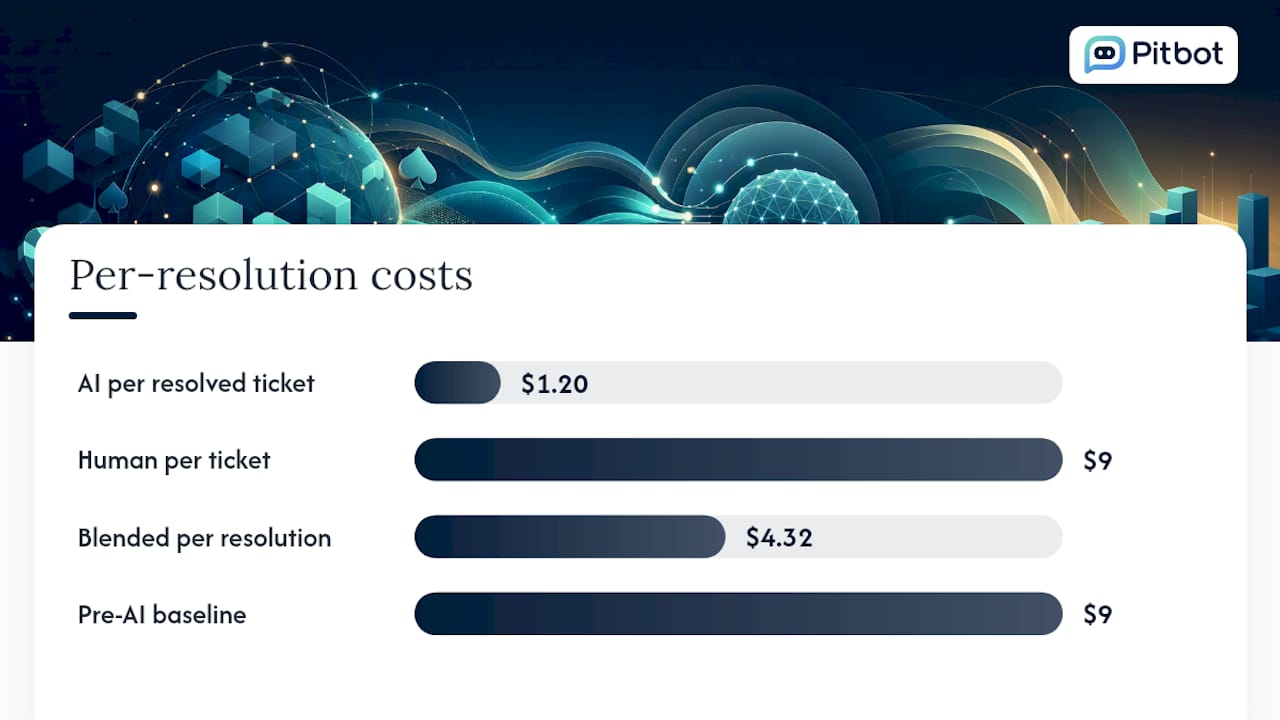
A worked example: if AI resolves 60% of 10,000 monthly tickets at $1.20 each and humans handle the remaining 40% at $9 each, blended cost per resolution comes to roughly $4.32, against a pre-AI baseline of $9 flat. That’s a 52% reduction on paper, though real net savings run lower once platform fees, review overhead, and optimisation work are deducted, which is exactly why the 20–35% net figure is the one to plan a budget around, not the headline percentage.
Why do AI support projects fail to deliver savings?
Most shortfalls trace back to the same handful of causes, and analyst research on cost-reduction programmes backs this pattern consistently.
- Outdated knowledge bases. Stale articles were cited as a factor in 43% of underperforming deployments in some studies; AI can only be as accurate as what it’s reading.
- Unclear escalation rules. Ambiguity here causes double-handling, where a human re-answers a question the AI already attempted, wiping out the cost benefit.
- Over-reliance on vendor defaults. Skipping custom configuration and role definitions leaves quality inconsistent across query types.
- Missing cost-tagging. Without cost allocation by team, feature, or customer segment, budget regressions go unnoticed for months.
Pro Tip: Set a knowledge base review cadence of no longer than four weeks for anything touching pricing, promotions, or compliance content. Anything stale here doesn’t just cost money, it creates real regulatory exposure.
What does Pitbot’s approach tell us about doing this properly?
Some platforms build their approach around the belief that cost savings and compliance aren’t competing priorities in regulated markets, but different perspectives of the same problem. Holding AI-drafted replies for staff approval before they reach a player may sound like it would slow things down but can help protect the savings case by catching errors before they turn into escalations, refunds, or regulatory complaints.
The audit trail generated in such systems serves as a mechanism that helps operators prove, line by line, why every AI decision was made, which can be critical when a gambling regulator inquires. Operators using this model report faster response times and clearer operational analytics across multiple communication channels, though exact figures vary by deployment size and query mix.
What do integration costs and timelines actually look like?
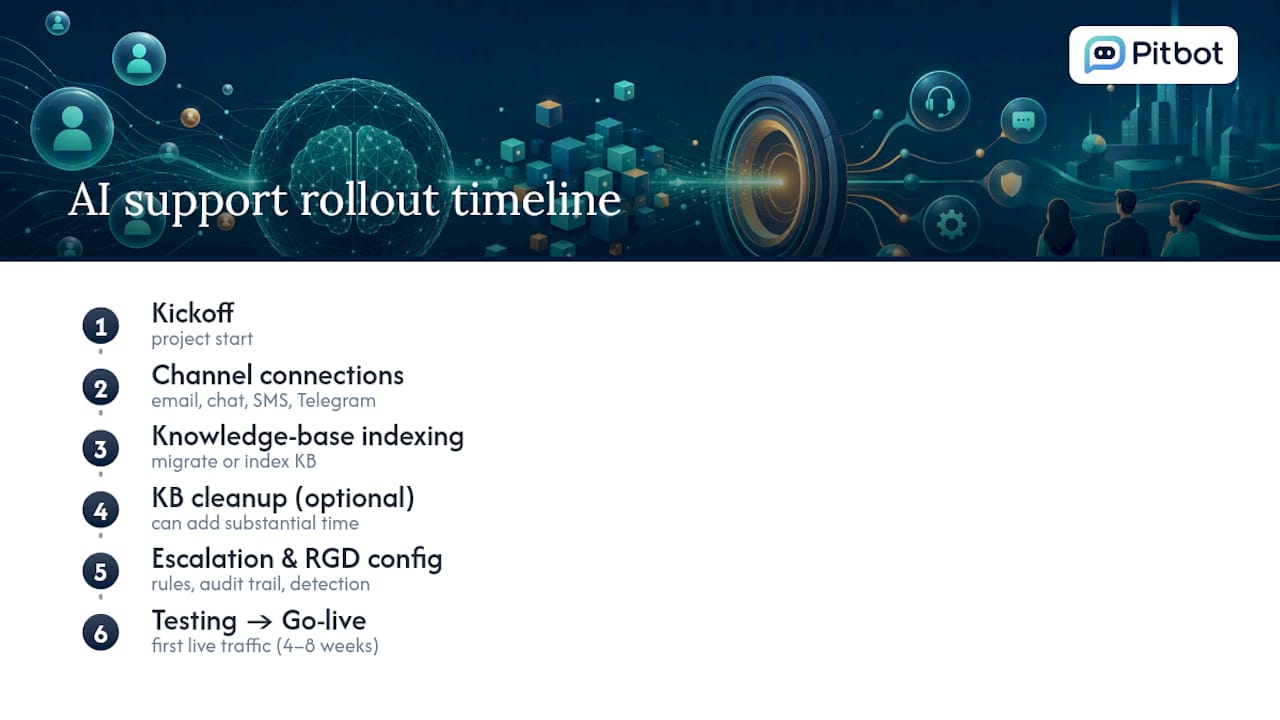
Deploying AI support software rarely happens overnight, and treating it as a plug-and-play switch is how budgets get blown. Initial integration typically covers connecting your existing channels (email, live chat, SMS, and messaging platforms like Telegram), migrating or indexing your knowledge base, and configuring escalation logic specific to your operation.
For a mid-sized operator, expect initial setup to run four to eight weeks from kickoff to first live traffic, longer if your knowledge base needs substantial cleanup first or if you’re running multiple brands under one support operation. Compliance-heavy sectors add time here because escalation rules, audit trail configuration, and responsible gambling detection logic all need testing before go-live, not after.
Ongoing integration costs tend to be smaller but continuous: knowledge base maintenance, periodic retraining as products or promotions change, and adjustments to escalation rules as query patterns shift. Budgeting for this ongoing layer matters as much as the initial rollout figure, because teams that treat integration as a one-off project rather than a maintained system are exactly the ones showing up in the failure-cause statistics above.
Should you budget for upfront investment or ongoing operating costs?
Both, and the ratio between them is where a lot of business cases go wrong. Upfront investment covers platform onboarding, channel integration, knowledge base preparation, and initial configuration of escalation and routing rules. This is a largely fixed, one-time cost, though it scales somewhat with the number of channels and brands involved.
Ongoing operational expense is the recurring subscription fee plus the variable cost of the underlying AI inference, which fluctuates with volume unless you’ve applied the routing and caching levers already covered. This is precisely why the engineering playbook matters as much as the initial contract: two operators paying identical subscription fees can end up with very different ongoing costs purely based on how well they’ve controlled inference spend.
A sensible way to frame the comparison for a budget committee is this: upfront cost is largely predictable and one-time; ongoing cost is variable but controllable, and the controls (caching, routing, output limits) are where sustained savings actually come from after the first few months. Operators who treat the ongoing side as a fixed subscription fee and never touch the underlying levers tend to see their net savings erode over eighteen to twenty-four months as volume grows and inference costs creep up unchecked.
What the benchmarks don’t tell you
The industry-wide 30% figure gets cited constantly, and it’s not wrong, but it obscures the more useful question: 30% of what, measured how? A programme that deflects heavily but resolves poorly can report impressive-looking deflection numbers while actually increasing total cost through repeat contacts and lost customer goodwill. That distinction between deflection and resolution deserves far more attention than it gets in most vendor pitches.
The conventional advice tells operators to focus first on model selection: which provider, which version, which context window. That’s backwards. The efficiency frontier framing, where you use the cheapest model that clears your quality bar and route only genuinely hard cases upward, matters more than which frontier model you pick. Model choice is a lever you pull once. Routing, caching, and knowledge base discipline are levers you pull continuously, and continuous levers are where the real savings compound.
For regulated operators specifically, the priority should be governance before growth: get escalation rules and audit trails right before scaling volume, not after. Retrofitting compliance onto a system that’s already processing thousands of player interactions is far more expensive than building it in from the first deployment.
— pitbot
Ready to see these savings applied to your operation?
Pitbot was built specifically for online casino and iGaming operators, which means the escalation rules, audit trails, and responsible gambling detection this article covers aren’t add-ons, they’re the foundation.
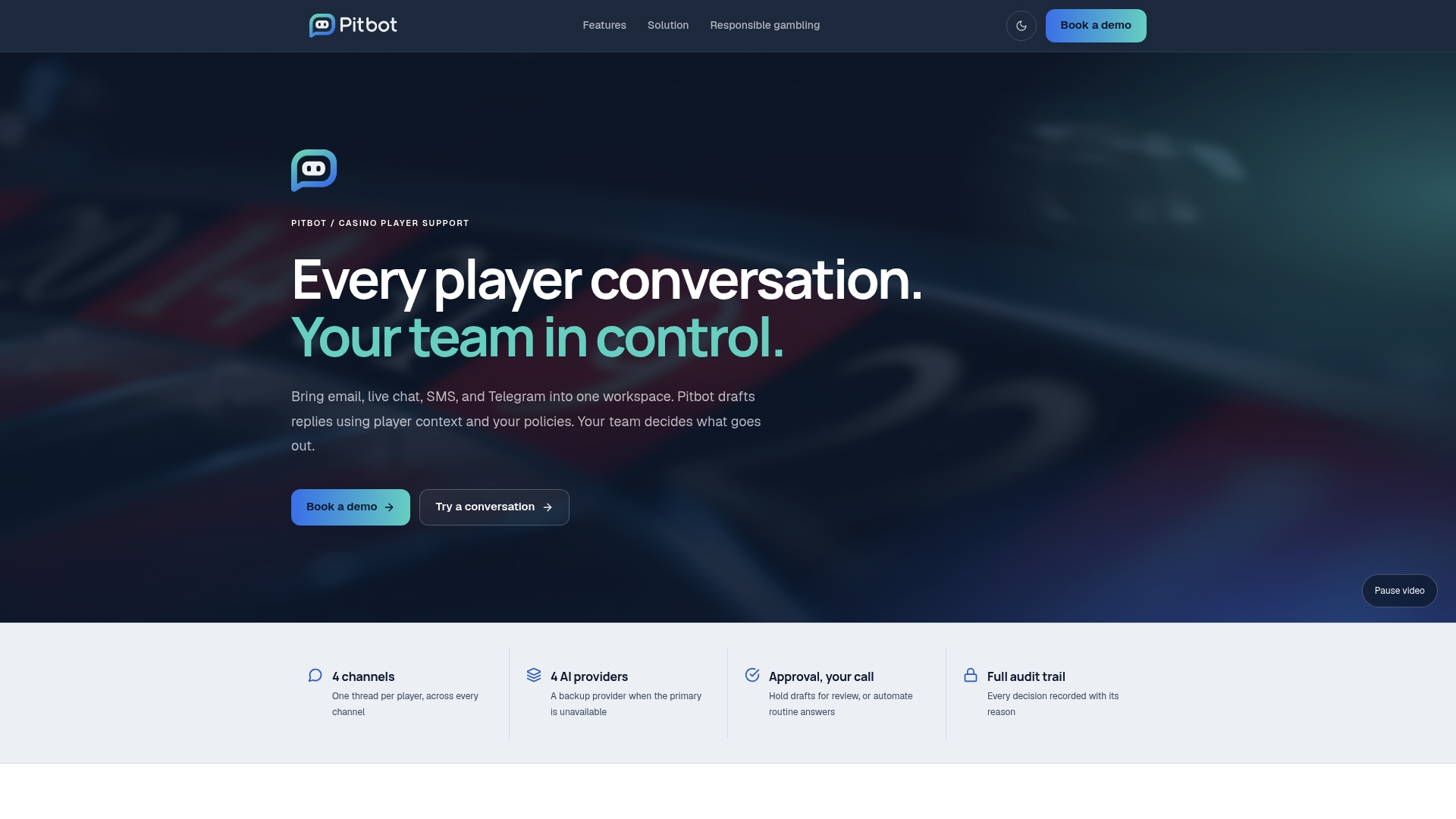
Pitbot combines multiple AI providers with staff approval of AI-drafted replies: with auto send off, replies on email, live chat and Telegram wait for a person before they reach a player, giving you the deflection economics covered above without handing full autonomy to a model in a regulated conversation. That structure is what makes the audit trail complete: every decision, human and AI, is logged and reviewable. If you’re managing VIP communication across email, live chat, SMS, and Telegram and want to see how the omni-channel player support model handles your specific volume and compliance requirements, the fastest way to find out is to look at the platform features directly or book a demo to walk through your own numbers.
Sources
- AI Customer Service Cost Savings (2026): 47 stats (+30% ROI)
- The economics of agent optimization — four ways to lower the cost
- AI customer service cost savings by industry
- Why most AI cost-reduction programmes fall short
FAQ
What is the 30% rule in AI support savings?
It refers to the widely cited average reduction in support operating costs after AI deployment, around 30%, with top-quartile operators reaching closer to 50–53%.
How does AI actually save money in customer support?
It saves money primarily through resolved deflection that avoids new hires, faster handle times on human-assisted tickets, and coverage of after-hours and surge demand without extra staffing costs.
Which support jobs are least likely to be replaced by AI?
Roles handling complex escalations, regulatory judgement calls, and VIP or high-value relationship management tend to stay human-led longest, which is why platforms like Pitbot let you hold AI-drafted replies for staff approval rather than run full automation for regulated player interactions.
Is AI really getting cheaper to run?
Underlying inference costs have trended downward as market competition and efficiency techniques mature, though your actual bill depends heavily on whether you’ve applied routing, caching, and output controls rather than running everything on a single large model by default.
How much does it typically cost to integrate AI support software?
Upfront integration costs vary by channel count and knowledge base complexity, typically taking four to eight weeks to go live; Pitbot publishes its plans on the pricing page: Starter, Growth, Scale and Enterprise, and you can start free.