
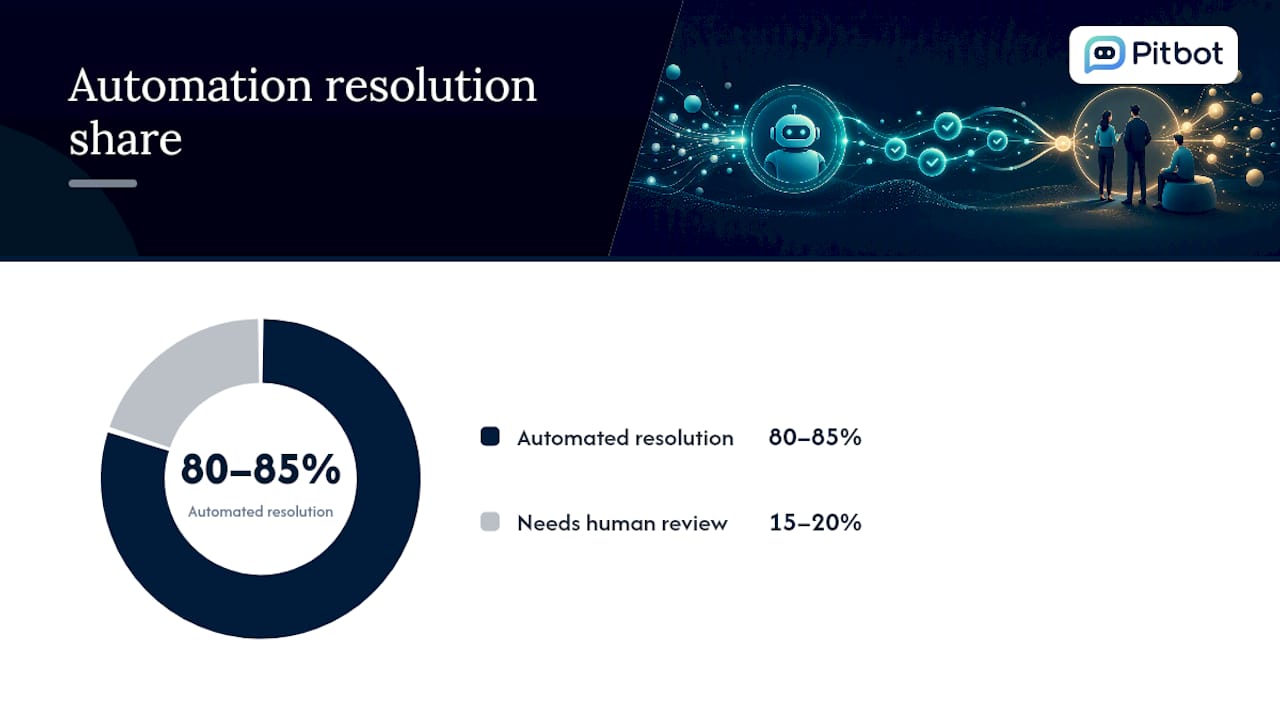
Yes, 24/7 support automation delivers measurable value: it can resolve 80 to 85% of repetitive customer inquiries without a human touching them, and it cuts initial response times to under two minutes in most well-built deployments. The catch is that “well-built” is doing a lot of work in that sentence. What follows covers the architecture, the rollout, the governance, and the metrics that separate a system players trust from one that just annoys them more quickly.
TL;DR:
- An effective 24/7 support automation system resolves 80 to 85% of routine inquiries without human involvement, with response times often under two minutes.
- Successful deployment requires tight integration with CRM, knowledge bases, and payment systems, along with continuous knowledge updates and real-time data sync.
- Escalation protocols must trigger when queries involve high risk, complex judgment, or negative customer sentiment, with clear context provided to human agents.
- Regular operational reviews, knowledge curation, and over-automation of high-risk actions are vital to prevent trust and compliance failures.
- A phased, narrow pilot focusing on one channel and query type is recommended, especially for regulated sectors like online casinos, where oversight and audit trails are legally mandatory.
Table of Contents
- What is 24/7 support automation, and what does it actually improve?
- What components does a reliable 24/7 system need?
- How do you roll out 24/7 support automation, step by step?
- How do you keep automation compliant and safe to escalate?
- Which metrics actually prove the business case?
- What mistakes derail 24/7 automation, and how do you avoid them?
- How does this look in a regulated market like online casino support?
- When should always-on automation actually be the priority?
- Ready to pilot compliant 24/7 automation for player support?
- Sources
- FAQ
What is 24/7 support automation, and what does it actually improve?
24/7 support automation means AI agents, self-service tools, and routing logic handle customer queries continuously, across every channel, without waiting for a human shift to start. It is not a chatbot bolted onto a website. It is a layer that reads intent, pulls account data, answers or escalates, and logs everything, whether the query lands at 2pm on a Tuesday or 4am on a bank holiday.
The benefits are concrete rather than vague. Customer satisfaction scores tend to rise because response time, more than resolution quality, is what most people rate first. Agent attrition drops because staff stop handling the same five password reset questions on repeat and get pushed toward the cases that actually need judgement. And churn falls, because customers now treat round-the-clock availability as a baseline expectation rather than a bonus. IBM notes that failing to offer always-on self-service creates steady, incremental churn, not a dramatic one-off drop, which makes the cost easy to underestimate until you look at retention over a full year.
The numbers back this up at scale:
- Gartner data shows AI-driven automation resolving 80 to 85% of standard inquiries with no human intervention.
- Response times on automated channels frequently land under two minutes, and some platforms push routine requests down to 15 to 30 seconds.
- The remaining 15 to 20% of complex cases are exactly where human agents should be spending their time, not on repeated status checks.
Quick fact: the gap between “automation exists” and “automation works” is almost always the integration layer, not the AI model. A brilliant language model with no access to account data still can’t tell a player why their withdrawal is delayed.
What components does a reliable 24/7 system need?
Every durable always-on support setup is built from the same core pieces, whether it serves a retail bank or an online casino floor. Skip one and the system degrades quietly, usually in ways nobody notices until a complaint escalates.
Integration layer. The automation needs live, two-way access to your CRM, your ticketing system, your knowledge base, and your telephony or CCaaS platform. Salesforce is blunt about this: automated customer service only functions when it is wired into CRM and ticketing infrastructure with multilingual coverage and audit-ready logging built in from day one. Without that, the AI is guessing rather than answering.
AI capability layer. This is where intent detection, sentiment analysis, multilingual processing, and action connectors sit. Intent detection decides whether a message is a billing question or a complaint. Sentiment analysis flags when a calm query is turning into a frustrated one. Action connectors let the system actually do something, updating an account, issuing a refund within set limits, rather than just describing what should happen.
Operational layer. Logging, observability, and monitoring sit underneath everything else. You need to know when the system is degrading before a customer tells you.
A practical checklist for this layer looks like:
- CRM and ticketing integration with real-time sync, not batch updates
- Knowledge base connected directly to the AI, not a static PDF nobody has updated since last year
- Payment and account API access with permission boundaries
- Full audit trail capturing every automated decision and every human review
- Multilingual processing where your customer base spans more than one language
Each piece matters on its own, but they only add up to something reliable when they’re wired together, not stacked as separate tools.
How do you roll out 24/7 support automation, step by step?
Before writing a single integration, decide whether you’re building, buying, or blending the two. Building in-house makes sense only if you have engineering capacity to spare and a genuinely unusual workflow. Buying a purpose-built platform is faster and usually cheaper over eighteen months, since you’re not maintaining model infrastructure yourself. A hybrid approach, buying the core platform and customising workflows and integrations around it, is what most mid-sized operators end up choosing, because it balances speed against control.
Once that decision is made, a phased rollout keeps risk contained:
- Pilot scope. Pick one channel and one query category, such as account queries on live chat, rather than launching everywhere at once.
- Knowledge curation. Structure your SOPs and policies specifically for AI consumption before touching integrations. This step gets skipped constantly and it is the single biggest predictor of a rocky launch.
- Integrations. Connect CRM, ticketing, and knowledge base, then test data flow both directions before adding automated actions.
- Supervised training. Run the AI in shadow mode, drafting responses that a human reviews before sending, for two to four weeks.
- Soft launch. Go live on the pilot channel with human-in-the-loop review still active on anything above a defined risk threshold.
- Scale. Expand channel by channel once acceptance criteria (resolution rate, false-escalation rate, sentiment accuracy) are consistently met.
Timelines vary with complexity. Vendor deployments commonly move from pilot to production in one to four weeks for straightforward cases, longer where enterprise integrations or regulatory review are involved. Resourcing typically needs a product owner, a knowledge manager who owns the SOPs, engineering support for integrations, a compliance lead where regulation applies, and a support lead who signs off on the escalation design.
Pro Tip: Assign the knowledge manager role before you assign anyone else. A system with perfect integrations and a poorly structured knowledge base will still give confidently wrong answers, which is worse for trust than no automation at all.
How do you keep automation compliant and safe to escalate?
The riskiest failure mode in 24/7 automation isn’t a wrong answer, it’s a wrong action taken autonomously. Gartner’s sector guidance is direct on this: financial changes, withdrawals, and other irreversible actions need a documented human verification step, never fully autonomous execution, however confident the model appears.
Design escalation around three triggers: complexity (the query needs judgement the AI hasn’t been trained to make), sentiment (the customer’s tone signals distress or anger), and account risk (the action touches money, identity, or a flagged account). When any of these fire, the system should hand off rather than push forward.
What actually makes handoffs work is the payload sent to the human. Well-designed escalation pushes the diagnosed intent, the sentiment score, a recommended next action, and the full conversation history to the agent, so nobody re-asks the customer what they already said. Losing that context is the single most common reason customers say automation “wasted their time” even when the underlying issue was resolved quickly.
Compliance depends on the audit trail underneath all of this:
- Every automated response and every human review logged with a timestamp and reviewer ID
- Multilingual interactions logged in both the original language and a translated version for review
- Data retention rules that match your regulator’s requirements, not a generic default
- A record of every escalation, including why it was triggered
Salesforce’s own framework treats compliance-ready audit trails as a baseline requirement, not an add-on, for exactly this reason: regulators and internal risk teams both want a record they can reconstruct after the fact.
Which metrics actually prove the business case?
Executives don’t fund automation because it sounds modern. They fund it because the numbers move, and the KPI set needs to show that clearly.
Track these as your core set:
- First response time, the clearest early signal that automation is working at all
- CSAT or ASAT, satisfaction specifically on the automated interaction, not blended with human-handled cases
- Deflection rate, the share of queries fully resolved without human involvement
- Resolution rate, distinct from deflection because a query can be deflected but not actually solved
- Cost per contact, the figure finance actually cares about
Benchmark against the same industry figures that opened this article: 80 to 85% deflection on standard inquiries and sub two-minute response times are realistic targets once the system is mature, not launch-day expectations. Translate that into money by multiplying deflected volume against your current cost per human-handled contact. A support team fielding 10,000 monthly queries at even a modest cost per contact sees the maths shift quickly once 80% of that volume no longer needs a person.
What mistakes derail 24/7 automation, and how do you avoid them?
The failures are predictable, and nearly all of them trace back to the same handful of causes.
Poor knowledge curation tops the list. If your SOPs are outdated or contradictory, the AI will confidently repeat those contradictions at scale, all day, every day. Lost context at handoff is close behind: customers who repeat themselves to a human after already explaining the issue to a bot disengage fast, and it shows up in satisfaction scores within weeks. Over-automating risky actions, letting the system execute account or payment changes without review, is the mistake that turns into a genuine incident rather than just a bad review.
The fix is a short set of operational habits, applied consistently rather than once at launch:
- Test continuously against real queries, not just the scenarios you designed for
- Align automation SLAs with your actual customer promise, not an aspirational one
- Update the knowledge base on a fixed cadence, weekly for fast-moving policies, monthly for stable ones
- Expand channel coverage in stages, never all at once
- Review a sample of automated interactions manually every week, regardless of how well the system is performing
Pro Tip: Knowledge curation beats reactive prompt engineering almost every time. If you find yourself constantly rewriting prompts to fix bad answers, the real fix is usually the underlying SOP, not the prompt.
How does this look in a regulated market like online casino support?
Regulated sectors raise the stakes on everything above. Player queries touch money, identity, and in some jurisdictions, responsible gambling obligations, so the margin for a confidently wrong automated answer is thin.
A hybrid model, multiple AI providers generating responses with staff reviewing before anything reaches the player, addresses the core tension: speed without sacrificing compliance. That review layer is what turns an AI reply from a risk into an asset, because every decision carries a record of who approved it and when.
In practice, that setup covers:
- Omni-channel coverage across email, live chat, SMS, and Telegram, with context following the player between channels rather than resetting each time
- Thread assignment so a high-value player’s conversation stays with a named owner instead of waiting in a generic queue
- Human review specifically on high-risk transactions, withdrawals, account disputes, and anything touching responsible gambling flags
- A full audit trail of every AI-generated reply and every staff decision, built for regulatory review rather than assembled after the fact
This is the model some platforms are built around for online casino operators, treating human oversight as a permanent feature of the workflow rather than a fallback for when automation fails.
When should always-on automation actually be the priority?
Automation earns its priority the moment your after-hours volume is high enough that customers are waiting until the next business day for answers a machine could give in minutes. If your volume is low and your queries are mostly unique, invest in headcount or outsourcing first.
Success also demands a cultural shift: support staff need to see automation as freeing them for harder cases, not as a threat. Early wins come from picking one visible, high-volume, low-risk query type, automating it well, and showing the time saved before expanding anywhere else.
— pitbot
Ready to pilot compliant 24/7 automation for player support?
Some AI support platforms for online casinos let you hold AI-drafted replies for staff approval before a player sees them, combining multiple AI providers, omni-channel coverage across email, live chat, SMS, and Telegram, thread assignment to named owners, and a full audit trail of every decision, all from one dashboard.
If you’re weighing pilot scope right now, start narrow: one channel, one query category, with human review active on anything touching withdrawals or responsible gambling flags. That’s exactly how Pitbot deployments typically begin. You can see the full breakdown of channel and compliance features on the Pitbot features page, review how the platform handles player support for online casino operators, or go straight to booking a demo to walk through a pilot scope with the team.
Sources
FAQ
How do you automate customer support?
Start by integrating your CRM, ticketing system, and knowledge base, then layer AI for intent detection and response drafting, with human review on anything above a defined risk threshold. A phased rollout, pilot, then supervised training, then scale, keeps the process controlled.
Why does 24/7 customer support matter?
Customers now treat round-the-clock availability as standard, and IBM’s research shows that failing to offer it leads to steady, incremental churn rather than one dramatic loss. Waiting until the next business day for a routine answer is increasingly seen as a service failure.
How do I reach a live customer service agent instead of a bot?
Well-designed automation includes clear escalation triggers, so asking directly for a human, or showing signs of frustration or a complex issue, should route you to a live agent automatically. If a system offers no visible escalation path, that’s a design flaw worth flagging to the provider.
What does “automated support” actually mean?
Automated support means AI systems, self-service tools, and routing logic handle customer queries without a human answering first, though best practice keeps humans reviewing high-risk or complex cases rather than removing them entirely. It’s not the absence of people, it’s a redistribution of where their time goes.
How much of support can realistically be automated?
Mature deployments resolve 80 to 85% of standard inquiries without human intervention, leaving the remaining 15 to 20% for staff to handle. That ratio holds fairly consistently across sectors once knowledge curation and integrations are done properly.