
Compliant customer support runs on seven fixed elements: a lawful basis for processing support data, signed Data Processing Agreements with every vendor, a documented Record of Processing Activities, working rights request workflows, encryption and access controls, a clear retention and deletion policy, and a breach response procedure that hits the 72-hour reporting window. Miss any one of these and the rest of your compliance work rests on a gap that a regulator or a customer complaint will eventually find. The sections below turn each obligation into checks, SOPs and vendor questions you can act on this week.
TL;DR:
- Ensuring compliance involves consolidating all support data channels and maintaining an up-to-date Record of Processing Activities to prevent data fragmentation.
- Vendors must provide a signed Data Processing Agreement, a current sub-processor list, and support data export and deletion functions; failure in these areas increases legal risks.
- Handling subject access requests promptly requires immediate logging, identity verification, and ensuring backups and analytics exports are also inclusive of the request.
- Using AI tools demands data redaction, regular DPIAs, and clear documentation of encryption, residency options, and third-party processing to prevent GDPR violations.
- Regular staff training and simulated requests help embed these policies into daily routines, reducing human errors and supporting incident readiness.
Table of Contents
- An at-a-glance GDPR checklist for customer support teams
- Who’s responsible: controller, processor, DPA and your RoPA
- Handling subject access requests inside your support channels
- Building a compliant support stack: tooling, AI and third parties
- Retention and deletion: how long is too long?
- Breach preparedness: your incident playbook for support data
- Training agents to make compliance a daily habit
- How an AI-plus-human review model supports these controls
- A support manager’s seven-point to-do list this week
- How Pitbot reduces the compliance overhead of AI support
- Where to check the detail yourself
- Sources
- FAQ
An at-a-glance GDPR checklist for customer support teams
Start by consolidating every inbound channel, email, live chat, SMS, social DMs, into a single ticket store. Scattered inboxes are the single biggest reason support teams cannot answer a subject access request within the one-month deadline, because nobody knows where all the data actually sits.
Once channels are unified, work through this list:
- Map a RoPA entry for each channel: what’s collected, why, and where it’s stored.
- Confirm the lawful basis for support processing, usually contractual necessity or legitimate interest, and write it down.
- Get a signed DPA from every vendor touching customer data, and request an up-to-date sub-processor list.
- Set retention windows per data type and automate deletion rather than relying on staff to remember.
- Enable export and delete functions ahead of time, not when the first request lands.
- Confirm TLS encryption, role-based access permissions, audit logging and a written incident playbook are all live.
None of this is exotic. It’s the same operational hygiene the ICO’s guidance expects any organisation handling personal data to demonstrate on request.
Who’s responsible: controller, processor, DPA and your RoPA
Your organisation is almost always the controller for support data, which means you decide why data is collected and how long it’s kept. Every helpdesk, chat widget or AI vendor you use is a processor acting on your instructions under Article 28, and that distinction carries real weight: you can’t outsource accountability, only the processing itself.
Three things belong on your desk before any vendor goes live:
- A signed DPA covering the scope of processing, named or categorised sub-processors, the security measures in place, and a commitment to delete or return data at contract end.
- A current sub-processor list from each vendor, checked whenever they add a new AI model provider or hosting partner, since transparency here is one of the fastest ways to spot a risky vendor.
- A RoPA entry recording the purpose of support processing, the categories of data involved, who receives it, how long it’s retained, and what technical safeguards protect it.
Treat the RoPA as a living document. Update it every time a new channel, tool or sub-processor enters the support stack, not once a year during an audit.
Handling subject access requests inside your support channels
A subject access request rarely announces itself with a legal letter. It usually arrives as “send me everything you have on me” typed into live chat, or a terse email asking what data you’re holding. Agents need to recognise these requests on sight, across every channel, because the one-month response clock starts the moment the request is received, not when someone in compliance notices it.
The practical workflow looks like this:
- Log the request immediately, whatever channel it came in on, with a timestamp.
- Verify identity using information you already hold, not by asking for more personal data than necessary.
- Route it to a named owner with a clear SLA; complex requests can be extended by up to two further months, but only with the customer informed and a reason recorded.
- Export the person’s support history in a portable format, and redact any third-party personal data (another customer’s name in a chat log, for instance) before sending it.
- Confirm that any deletion request propagates beyond the live ticket store into backups, analytics exports and any AI tool that cached the conversation.
Pro Tip: Run a mock SAR every quarter using a fake internal profile. If your team can’t locate, export and redact that person’s full support history within a working day, your real one-month deadline is at risk.
The ICO’s practical guidance is explicit that erasure and access requests apply to backups and secondary copies, not just the primary system, which is where most teams quietly fall short.

Building a compliant support stack: tooling, AI and third parties
Article 25 requires data protection by design and by default, and the EDPB’s guidelines make clear this is a continuous obligation, not a box ticked at launch. It applies just as much to a helpdesk you bought five years ago as to a new AI assistant you’re piloting this quarter.
AI customer support tools raise this bar rather than lowering it. Feeding raw ticket data, names, account numbers, payment details, into a third-party model without redaction is a data minimisation failure before the model even generates a reply, and using identifiable customer conversations to train a shared model without a clear legal basis is one of the most common mistakes support teams make when adopting AI.
Before signing with any vendor, work through this checklist:
- Does the vendor redact personal data before it reaches any external model call?
- Is there a signed DPA and a published, current sub-processor list?
- Can you choose data residency, and does the vendor support one-click export and delete?
- Are audit logs and encryption in transit and at rest confirmed in writing, not just implied in marketing copy?
International transfers add another layer. EU hosting alone does not solve transfer risk if a sub-processor or AI model provider processes data outside the EEA, which is common with large language model vendors. Standard Contractual Clauses plus supplementary technical measures, encryption keys held in the EEA, for instance, are usually still required even when a vendor advertises “EU servers.”
Retention and deletion: how long is too long?
A defensible retention policy needs a reason, not a round number picked out of habit. Practitioner guidance commonly recommends a retention period that covers typical customer service needs, unless a specific legal obligation (a financial dispute, a regulatory record-keeping rule) requires longer.
Whatever window you choose, automate it:
- Set retention rules by data category, not by a single blanket policy across every channel.
- Automate purges so deletion runs on a schedule, rather than depending on someone remembering.
- Confirm backups and analytics exports follow the same schedule; a deleted ticket that survives in a nightly backup for three years defeats the point.
- Document the retention period and its justification directly in your RoPA.
Purpose limitation is the underlying principle: you keep data because you have a specific reason to, and once that reason expires, so does your justification for holding it.
Breach preparedness: your incident playbook for support data
A support-context breach is broader than most teams assume. An agent emailing a ticket export to the wrong address, a misconfigured integration exposing chat logs, or a compromised helpdesk login all count if personal data is put at risk.
When something happens, the sequence matters:
- Contain and assess immediately: revoke access, isolate the affected system, and establish roughly how many people and what data categories are involved.
- Collect evidence and draft a timeline while details are fresh, since the 72-hour notification clock to your supervisory authority starts from when you became aware, not when containment finished.
- Notify the regulator and, where risk to individuals is high, the affected customers, using a plain-language template that explains what happened and what you’re doing about it.
- Review and update your RoPA and SOPs afterwards; every breach should change something in how the team operates, not just get logged and forgotten.
Training agents to make compliance a daily habit
Policy documents don’t stop mistakes; habits do. Agents need concrete rules baked into their daily workflow, not an annual training slide deck nobody remembers by March.
Build these into onboarding and refreshers:
- Never store sensitive categories of data (health information, payment card numbers) in free-text ticket fields; use redaction patterns or dedicated secure fields instead.
- Document, in one line, why any unusual data was kept when it genuinely can’t be avoided.
- Use a consistent verification script before discussing account details, and capture consent explicitly wherever it’s the lawful basis in play.
- Run periodic access reviews so former staff and unused integrations lose their permissions promptly.
Pro Tip: Add a single mandatory field to your ticketing system: “sensitive data present, yes or no.” It takes agents two seconds and gives compliance officers a searchable flag instead of a manual audit.
Simulated SAR exercises, mentioned earlier, double as training: they show agents exactly how a real request would move through the system, and where it currently gets stuck.
How an AI-plus-human review model supports these controls
The design of some AI support platforms reflects several of the checks above directly. AI-generated replies can pass through human review before reaching a player, providing a checkpoint to catch data that shouldn’t be shared and to log decisions made, rather than relying purely on automated output. Multi-channel integration across email, live chat, SMS, and Telegram consolidates support data in one auditable system instead of scattered inboxes, aligning with the checklist’s recommendations.
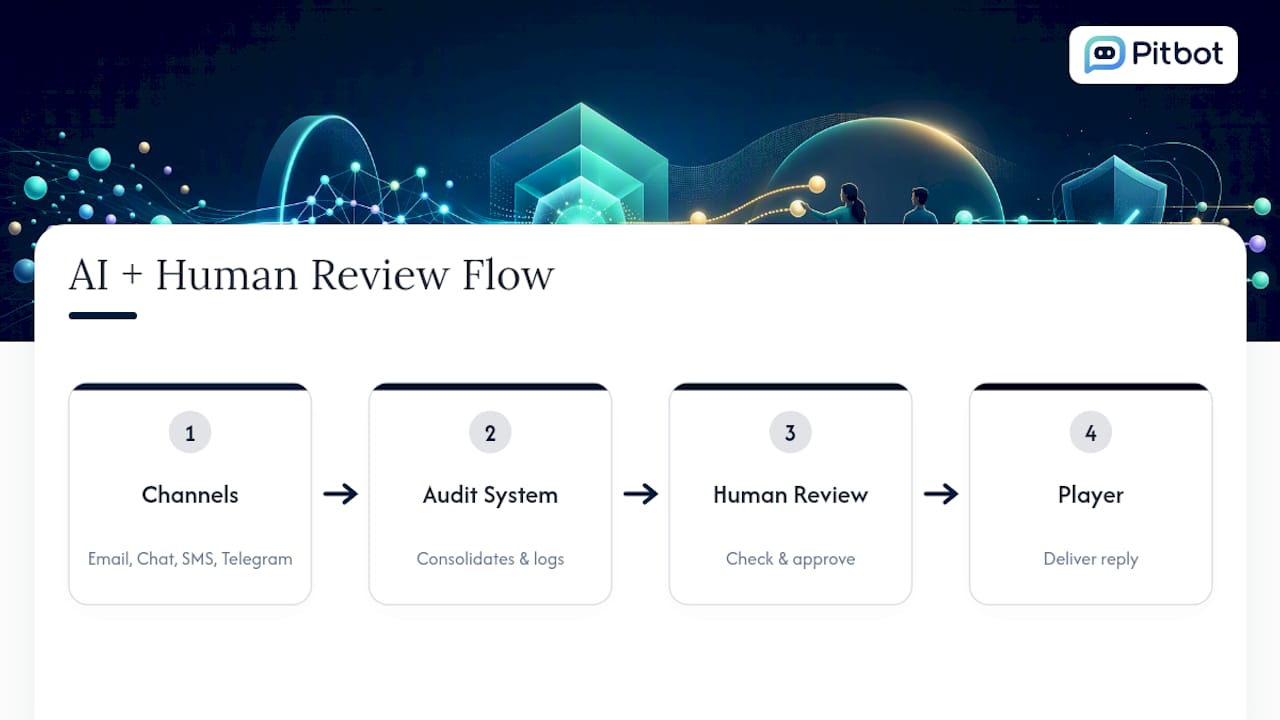
None of that replaces your own procurement diligence. Whichever platform you evaluate, ask the same three questions: is there a signed DPA, can sub-processors be listed and checked, and do export and delete functions work on demand rather than in theory? A vendor that can’t answer clearly in writing isn’t ready for a regulated support operation, whatever the sales deck claims.
A support manager’s seven-point to-do list this week
If I ran a support team facing an audit next quarter, here is the order I would work through, because sequencing matters more than most managers assume.
Map every channel into your RoPA first, since you can’t protect data you haven’t listed. Request signed DPAs from every vendor next, because gaps here take the longest to close. Set one retention rule per data category, then run a mock SAR to see where it actually breaks. Train agents on redaction the same week, verify your sub-processor list is current, and if AI handles support at any real volume, schedule a DPIA before it scales further, not after.
— pitbot
How Pitbot reduces the compliance overhead of AI support
Running compliant AI support usually means juggling redaction tooling, audit logging and vendor paperwork across several separate systems. Some platforms bring human review, audit trail, and multi-channel capture into a single dashboard, so the checkpoints your compliance team needs — who approved a reply and what data it touched — sit in one place instead of being scattered across integrations.
That doesn’t remove your procurement homework. Before rolling out AI-powered player support with any vendor, still ask for a signed DPA, a current sub-processor list, working delete and export functions, and confirmation of encryption in transit and at rest. Pitbot’s feature set masks a player’s contact details before a message reaches a model provider, alongside its responsible gambling detection tools, built for operators who need an audit trail regulators can actually follow.
If your support stack is due a compliance review, book a demo and walk through exactly how the review workflow, PII masking and audit logs would apply to your own player data.
Where to check the detail yourself
- ICO UK GDPR guidance for practical rules on subject access requests, retention and deletion.
- EDPB guidelines on data protection by design and by default for Article 25 obligations.
- European Commission data protection overview for the general EU legal framework.
- Gdpr for plain-language compliance checklists aimed at smaller teams.
Sources
- EDPB guidelines on data protection by design and by default
- UK GDPR guidance and resources | ICO
- European Commission: data protection in the EU
- Standard contractual clauses (SCCs) for international transfers
FAQ
What rights does a customer have under GDPR?
Customers can request access to their data, correction of inaccurate records, erasure, restriction of processing, portability to another provider, and can object to certain processing, all within the one-month response window your support team must meet.
What are the seven core GDPR requirements?
They centre on lawful basis for processing, transparency to data subjects, purpose limitation, data minimisation, accuracy, storage limitation, and security, alongside accountability obligations like maintaining a RoPA and signing DPAs with processors.
How do I make a GDPR complaint?
A customer can complain directly to the organisation first, then escalate to the relevant national supervisory authority, such as the ICO in the UK, if the response is inadequate or the issue remains unresolved.
What counts as a breach of GDPR?
Any incident that compromises the confidentiality, integrity or availability of personal data counts, from a misdirected email containing ticket details to a compromised login exposing chat logs, and high-risk cases must be reported within 72 hours.
Does using AI in customer support break GDPR automatically?
No, but AI support isn’t automatically compliant either; it requires data minimisation, redaction before external model calls, a signed DPA with the AI vendor, and human oversight of outputs, which platforms like Pitbot support by letting you hold AI-drafted replies for staff approval before they reach a player.